Finit3-dev | Fast & Extensible init for Linux
=============================================
[![Travis Status]][Travis] [![Coverity Status]][Coverity Scan]

Finit3 is currently in heavy development, please use stable releases if
you want a stable and fully functional system. YMMV!
Table of Contents
-----------------
* [Introduction](#introduction)
* [Features](#features)
* [/etc/finit.conf](#etcfinitconf)
* [/etc/finit.d](#etcfinitd)
* [Runparts & /etc/rc.local](#runparts---etc-rc-local)
* [Bootstrap](#bootstrap)
* [Runlevels](#runlevels)
* [Inetd](#inetd)
* [Hooks, Callbacks & Plugins](#hooks-callbacks--plugins)
* [Rebooting & Halting](#rebooting--halting)
* [Commands & Status](#commands--status)
* [Building](#building)
* [Running](#running)
* [Debugging](#debugging)
* [Origin & References](#origin--references)
Introduction
------------
Init is the first userland process started by the UNIX kernel, therefore
it always has PID 1 and is responsible for starting up the rest of the
system.
Finit is a plugin-based init with [process supervision][1] similar to
that of D.J. Bernstein's [daemontools][2] and Gerrit Pape's [runit][3].
The main focus of Finit is on small and embedded GNU/Linux systems, yet
fully functional on standard server and desktop installations as well.
Traditional [SysV init][4] style systems are scripted. For low-resource
embedded systems this can be quite resource intensive and cause longer
boot times. Finit is optimized to reduce context switches and forking
of processes to provide a very basic bootstrap written entirely in C.
> Finit basically does everything you need from its `main()` function!
Hence, there is no `/etc/init.d/rcS` script, or similar, instead Finit
reads its configuration from [/etc/finit.conf](#etcfinitconf). This
file details what kernel modules to load, programs to run, daemons to
supervise, and inetd services to launch on demand.
See [TroglOS][9] for an example of how to boot a small embedded system
with Finit.
Features
--------
**Process Supervision**
Start, monitor and restart services should they fail.
**Inetd**
Finit comes with a built-in `inetd` server. No need to maintain a
separate config file for services that you want to start on demand.
All inetd services started can be filtered per port and inbound
interface, reducing the need for a full blown firewall.
Built-in optional inetd services:
- time (rdate) RFC862
- echo RFC868
**Runlevels**
Runlevels are optional in Finit, but support for [SysV runlevels][5] is
available if needed. All services in runlevel S(1) are started first,
followed by the desired run-time runlevel. Runlevel S can be started in
sequence by using `run [S] cmd`. Changing runlevels at runtime is done
like any other init, e.g. init 4
**Plugins**
Finit plugins can be *callbacks*, *boot hooks* into different stages of
the boot process, or *pure extensions*. Plugins are written in C and
compiled into a dynamic library that is loaded automatically by finit at
boot. A basic set of plugins that extend and modify the basic behavior
are bundled in the `plugins/` directory.
Capabilities:
- **Task/Run/Service callbacks**
Modify service arguments, override service monitor's decisions to
start/stop/reload a service.
- **Hooks**
Hook into the boot at predefined points to extend Finit
- **I/O**
Listen to external events and control Finit behavior/services
- **Inetd**
Extend Finit with internal inetd services, for an example, see
`plugins/time.c`
Extensions and functionality not purely related to what an `/sbin/init`
needs to start a system are available as a set of plugins that either
hook into the boot process or respond to various I/O.
/etc/finit.conf
---------------
Contrary to most other script based init alternatives ([SysV init][4],
[upstart][6], [systemd][7], [OpenRC][8], etc.) Finit reads its entire
configuration from `/etc/finit.conf`.
The command line arguments given in `/etc/finit.conf` to each service
provide a default. A plugin can be used to register a callback to a
service and then modify the behavior to suit the current runlevel and
system configuration.
For instance, before starting a heavily resource intensive service like
IPsec or OpenVPN, a callback can check if the outbound interface is up
and has an IP address, or just check if the service is disabled — much
like what a SysV init start script usually does.
Syntax:
* `check `
Run fsck on a file system before mounting it
* `module `
Load a kernel module, with optional arguments
* `network `
Script or program to bring up networking, with optional arguments
* `rlimit RESOURCE `
Modify the specified resource's hard or soft limit to be the
specifed limit. `RESOURCE` is a lower-case string matching the
constants in `setrlimit(2)` with the `RLIMIT_` prefix
removed. E.g. to select `RLIMIT_CPU`, `RESOURCE` would be
`cpu`. `LIMIT` is an integer whose unit depends on the resource
being modified, see `setrlimit(2)` for more information. The special
limit `infinity` means the there should be no limit on the resource,
i.e. `RLIM_INFINITY` is passed to `setrlimit(2)`.
```shell
# No process is allowed more than 8MB of address space
rlimit hard as 8388608
# Core dumps may be arbitrarily large
rlimit soft core infinity
```
* `runlevel `
N is the runlevel number 1-9, where 6 is reserved for reboot.
Default is 2.
* `run [LVLS] /path/to/cmd ARGS -- Optional description`
One-shot command to run in sequence when entering a runlevel, with
optional arguments and description. This command is guaranteed to be
completed before running the next command.
* `task [LVLS] /path/to/cmd ARGS -- Optional description`
One-shot like 'run', but starts in parallel with the next command
* `service [LVLS] /path/to/daemon ARGS -- Optional description`
Service, or daemon, to be monitored and automatically restarted if it
exits prematurely. Please note that you often need to provide a
`--foreground` or `--no-background` argument to most daemons to
prevent them from forking off a sub-process in the background.
```shell
service [2345] /sbin/ospfd -- OSPF daemon
```
For a detailed description of conditions, and how to debug them,
see the [Finit Conditions](doc/conditions.md) document.
* `inetd service/proto[@iflist] [LVLS] /path/to/daemon args`
Launch a daemon when a client initiates a connection on an Internet
port. Available services are listed in the UNIX `/etc/services` file.
Finit can filter access to from a list of interfaces, `@iflist`, per
inetd service as well as listen to custom ports.
```shell
inetd ftp/tcp nowait @root /usr/sbin/uftpd -i -f
inetd tftp/udp wait @root /usr/sbin/uftpd -i -t
```
The following example listens to port 2323 for telnet connections and
only allows clients connecting from `eth0`:
```shell
inetd 2323/tcp@eth0 nowait [2345] /sbin/telnetd -i -F
```
The interface list, `@iflist`, is of the format `@iface,!iface,iface`,
where a single `!` means to deny access. Notice how interfaces are
comma separated with no spaces.
The `inetd` directive can also have ` -- Optional Description`, only
Finit does not output this text on the console when launching inetd
services. Instead this text is sent to syslog and also shown by the
`initctl` tool. More on inetd below.
* `runparts `
Call [run-parts(8)][] on `DIR` to run start scripts. All executable
files, or scripts, in the directory are called, in alphabetic order.
It can be beneficial to use `S01name`, `S02othername`, etc. if there
is a dependency order between the scripts. Symlinks to existing
daemons can talso be used, but make sure they daemonize by default.
As the optional `/etc/rc.local` shell script, make sure that all your
services and programs either terminate or start in the background or
you will block Finit.
* `include `
Include another configuration file. Absolute path required.
* `tty [LVLS] `
Start a getty on the given TTY device DEV, in the given runlevels. If
no tty setting is given in `finit.conf`, or if `/bin/sh` is given as
argument instead of a device path, a single shell is started on the
default console. Useful for really bare-bones systems.
It is also possible to supply the full command line, with arguments,
to your getty. In this case finit will simply use that command.
See `finit.h` for the `#define GETTY` that is called, along with the
default baud rate.
**Note:** BusyBox getty, used when Finit is built for embedded
systems, can take a `DEV` with *or* without `/dev/` prefix. Make
sure to call the configure script with `--enable-embedded` if this
is what you want.
* `console make install no default `/etc/finit.conf` will
be installed since system requirements differ too much. Try out the
Debian 6.0 example `/usr/share/doc/finit/finit.conf` configuration that
is capable of service monitoring SSH, sysklogd, gdm and a console getty!
Every `run`, `task`, `service`, or `inetd` can also list the privileges
the `/path/to/cmd` should be executed with. Simply prefix the path with
`[@USR[:GRP]]` like this:
```shell
run [2345] @joe:users /usr/bin/logger "Hello world"
```
For multiple instances of the same command, e.g. a DHCP client or
multiple web servers, add `:ID` somewhere between the `run`, `task`,
`service` keyword and the command, like this:
```shell
service :1 [2345] /sbin/httpd -f -h /http -p 80 -- Web server
service :2 [2345] /sbin/httpd -f -h /http -p 8080 -- Old web server
```
Without the `:ID` to the service the latter will overwrite the former
and only the old web server would be started and supervised.
The `run`, `task`, `service`, or `inetd` stanzas also allow the keyword
`log` to redirect `stderr` and `stdout` of the application to syslog,
using `logger`.
/etc/finit.d
------------
Finit supports changes to the overall system configuration at runtime.
For this purpose the (configurable) directory `/etc/finit.d` is used.
Here you can put configuration file snippets, one per service if you
like, which are all sourced automatically by finit at boot when loading
the static configuration from `/etc/finit.conf`. This is the default
behavior, so no include directives are necessary.
To add a new service, simply drop a `.conf` file in `/etc/finit.d` and
run `initctl reload`. (It is also possible to `SIGHUP` to PID 1, or
call `finit q`, but that has been deprecated with the `initctl` tool).
Any service read from this directory is flagged as a dynamic service, so
changes to or removal of `/etc/finit.d/*.conf` files, is detected.
On `initctl reload` the following is checked for all services:
- If a service's `.conf` file has been removed, or its conditions are no
longer satisifed, the service is stopped.
- If the file is modified, or a service it depends on has been reloaded,
the service is reloaded (stopped and started).
- If a new service is added it is automatically started — respecting
runlevels and return values from any callbacks.
For more info on the different states of a service, see the separate
document [Finit Services](doc/service.md).
The `/etc/finit.d` directory was previously the default Finit `runparts`
directory. Finit no longer has a default `runparts`, so make sure to
update your setup, or the finit configuration, accordingly.
**Note:** Configurations read from `/etc/finit.d` are read *after*
initial bootstrap, runlevel S(1). Hence, bootstrap services *must* be
in `/etc/finit.conf`!
Runparts & /etc/rc.local
------------------------
At the end of the boot, when networking and all services are up, finit
calls its built-in [run-parts(8)][] on the `runparts ` directory,
and `/etc/rc.local`, in that order if they exist.
```shell
runparts /etc/rc.d/
```
No configuration stanza in `/etc/finit.conf` is required for `rc.local`.
If it exists and is an executable shell script, finit calls it at the
very end of the boot, before calling the `HOOK_SYSTEM_UP`. See more on
hooks and the system bootstrap below.
Bootstrap
---------
1. Populate `/dev`
2. Parse `/etc/finit.conf`
3. Load all `.so` plugins
4. Remount/Pivot `/` to get R+W
5. Call 1st level hooks, `HOOK_ROOTFS_UP`
6. Mount `/etc/fstab` and swap, if available
7. Cleanup stale files from `/tmp/*` et al
8. Enable SysV init signals
9. Call 2nd level hooks, `HOOK_BASEFS_UP`
10. Start all 'S' runlevel tasks and services
11. Load kernel parameters from `/etc/sysctl.conf`
12. Set hostname and bring up loopback interface
13. Call `network` script, if set in `/etc/finit.conf`
14. Call 3rd level hooks, `HOOK_NETWORK_UP`
15. Load all `*.conf` files in `/etc/finit.d/` and switch to the active
active runlevel, as set in `/etc/finit.conf`, default is 2. Here is
where the rest of all tasks and inetd services are started.
16. Call 4th level hooks, `HOOK_SVC_UP`
17. If `runparts ` is set, [run-parts(8)][] is called on ``
18. Call `/etc/rc.local`, if it exists and is an executable shell script
19. Call 5th level (last) hooks, `HOOK_SYSTEM_UP`
20. Start TTYs defined in `/etc/finit.conf`, or rescue on `/dev/console`
In (10) and (15) tasks and services defined in `/etc/finit.conf` are
started. Remember, all `service` and `task` stanzas are started in
parallel and `run` in sequence, and in the order listed. Hence, to
emulate a SysV `/etc/init.d/rcS` one could write a long file with only
`run` statements.
Notice the five hook points that are called at various point in the
bootstrap process. This is where plugins can extend the boot in any way
they please.
For instance, at `HOOK_BASEFS_UP` a plugin could read an XML file from a
USB stick, convert/copy its contents to the system's `/etc/` directory,
well before all 'S' runlevel tasks are started. This could be used with
system images that are created read-only and all configuration is stored
on external media.
Runlevels
---------
Basic support for [runlevels][5] is included in Finit from v1.8. By
default all services, tasks, run commands and TTYs listed without a set
of runlevels get a default set `[234]` assigned. The default runlevel
after boot is 2.
Finit supports runlevels 0-9, and S, with 0 reserved for halt, 6 reboot
and S for services to only run at bootstrap. Runlevel 1 is the single
user level, where usually no networking is enabled. In Finit this is
more of a policy for the user to define. Normally only runlevels 1-6
are used, and even more commonly, only the default runlevel is used.
To specify an allowed set of runlevels for a `service`, `run` command,
`task`, or `tty`, add `[NNN]` to your `/etc/finit.conf`, like this:
```shell
service [S12345] /sbin/syslogd -n -x -- System log daemon
run [S] /etc/init.d/acpid start -- Starting ACPI Daemon
task [S] /etc/init.d/kbd start -- Preparing console
service [S12345] /sbin/klogd -n -x -- Kernel log daemon
tty [12345] /dev/tty1
tty [2] /dev/tty2
tty [2] /dev/tty3
tty [2] /dev/tty4
tty [2] /dev/tty5
tty [2] /dev/tty6
```
In this example syslogd is first started, in parallel, and then acpid is
called using a conventional SysV init script. It is called with the run
command, meaning the following task command to start the kbd script is
not called until the acpid init script has fully completed. Then the
keyboard setup script is called in parallel with klogd as a monitored
service.
Again, tasks and services are started in parallel, while run commands
are called in the order listed and subsequent commands are not started
until a run command has completed.
Switching between runlevels can be done by calling init with a single
argument, e.g. init 5 switches to runlevel 5. When changing
runlevels Finit also automatically reloads all `.conf` files in the
`/etc/finit.d/` directory. So if you want to set a new system config,
switch to runlevel 1, change all config files in the system, and touch
all `.conf` files in `/etc/finit.d` before switching back to the
previous runlevel again — that way Finit can both stop old services and
start any new ones for you, without rebooting the system.
Inetd
-----
A built-in *Internet Super Server* support was added in Finit v1.12 and
v1.13, along with an internal `time` inetd service, RFC 868 (rdate).
The latter is supplied as a plugin to illustrate how simple it is to
extend finit with more internal inetd services.
> Please note, not all UNIX daemons are prepared to run as inetd services.
> In the example below `sshd` also need the command line argument `-i`.
The inetd support in finit is quite advanced. Not only does it launch
services on demand, it can do so on custom ports and also filter inbound
traffic using a poor man's [TCP wrappers][]. The syntax is very similar
to the traditional `/etc/inetd.conf`, yet keeping with the style of
Finit:
```shell
# Launch SSH on demand, in runlevels 2-5 as root
inetd ssh/tcp nowait [2345] @root:root /usr/sbin/sshd -i
```
A more advanced example is listed below, please note the *incompatible
syntax change* that was made between Finit v1.12 and v1.13 to support
deny filters:
```shell
# Start sshd if inbound connection on eth0, port 222, or
# inbound on eth1, port 22. Ignore on other interfaces.
inetd 222/tcp@eth0 nowait [2345] /usr/sbin/sshd -i
inetd ssh/tcp@eth1,eth1 nowait [2345] /usr/sbin/sshd -i
```
If `eth0` is your Internet interface you may want to avoid using the
default port. To run ssh on port 222, and all others on port 22:
```shell
inetd 222/tcp@eth0 nowait [2345] /usr/sbin/sshd -i
inetd ssh/tcp@*,!eth0 nowait [2345] /usr/sbin/sshd -i
```
Compared to Finit v1.12 you must *explicitly deny* access from `eth0`!
**Internal Services**
The original `inetd` had a few standard services built-in:
- time
- echo
- chargen
- discard
Finit currently supports the `time` and `echo` services. Both of which
are realized as plugins to provide a simple means of testing the inetd
functionality stand-alone. But this also provides both a useful network
testing/availability and a rudimentary time server for rdate clients.
Internal inetd services are set up as follows:
```shell
inetd time/udp wait [2345] internal
inetd time/tcp nowait [2345] internal
inetd echo/udp wait [2345] internal
inetd echo/tcp nowait [2345] internal
```
Then call `rdate` from a remote machine (or use localhost):
```shell
rdate -p
rdate -up
```
Or `echoping` to reach the echo service:
```shell
echoping -v
echoping -uv
```
If you use `time/udp` you must use the standard rdate implementation and
then call it with `rdate -up` to connect using UDP. Without the `-p`
argument rdate will try to set the system clock. Please note that rdate
has been deprecated by the NTP protocol and this plugin should only be
used for testing or environments where NTP for some reason is blocked.
Also, remember the UNIX year 2038 bug, or in the case of RFC 868 (and
some NTP implementations), year 2036!
**Note:** There is currently no verification that the same port is used
more than once. So a standard `inetd http/tcp` service will clash
with an ssh entry for the same port `inetd 80/tcp` …
Hooks, Callbacks & Plugins
--------------------------
Finit provides only the bare necessities for starting and supervising
processes, with an emphasis on *bare* — for your convenience it does
however come with support for hooks, service callbacks and plugins that
can used to extend finit with.
### Plugins
For your convenience a set of *optional* plugins are available:
* *alsa-utils.so*: Restore and save ALSA sound settings on
startup/shutdown. _Optional plugin._
* *bootmisc.so*: Setup necessary files and system directories for, e.g.,
UTMP (tracks logins at boot). This plugin is central to get a working
system and runs at `HOOK_BASEFS_UP`. The `/var`, `/run`, and `/dev`
file systems must be writable for this plugin to work.
Note: On an embedded system both `/var` and `/run` can be `tmpfs` RAM
disks and `/dev` is usually a `devtmpfs`. This must be defined in the
`/etc/fstab` file and in the Linux kernel config.
* *dbus.so*: Setup and start system message bus, D-Bus, at boot.
_Optional plugin._
* *echo.so*: RFC 862 plugin. Start as inetd service, like time below.
* *hwclock.so*: Restore and save system clock from/to RTC on
startup/shutdown.
* *initctl.so*: Extends finit with a traditional `initctl` functionality.
* *lost.so*: Very simple `HOOK_SVC_LOST` example. Logs process ID and
name to syslog. _Optional plugin._
* *netlink.so*: Listens to Linux kernel Netlink events for gateway and
interfaces. These events are then sent to the Finit service monitor
for services that may want to be SIGHUP'ed on new default route or
interfaces going up/down.
* *resolvconf.so*: Setup necessary files for `resolvconf` at startup.
_Optional plugin._
* *time.so*: RFC 868 (rdate) plugin. Start as inetd service. Useful
for testing inetd filtering — BusyBox has an rdate (TCP) client.
* *tty.so*: Watches `/dev`, using inotify, for new device nodes (TTY's)
to start/stop getty consoles on them on demand. Useful when plugging
in a usb2serial converter to login to your embedded device.
* *urandom.so*: Setup random seed at startup.
* *x11-common.so*: Setup necessary files for X-Window. _Optional plugin._
Usually you want to hook into the boot process once, simple hook plugins
like `bootmisc.so` are great for that purpose. They are called at each
hook point in the boot process, useful to insert some pre-bootstrap
mechanisms, like generating configuration files, restoring HW device
state, etc. Available hook points are:
### Bootstrap Hooks
* `HOOK_ROOTFS_UP`: When `finit.conf` has been read and `/` has is
mounted — very early
* `HOOK_BASEFS_UP`: All of `/etc/fstab` is mounted, swap is available
and default init signals are setup
* `HOOK_NETWORK_UP`: System bootstrap, runlevel S, has completed and
networking is up (`lo` is up and the `network` script has run)
* `HOOK_SVC_UP`: All services in the active runlevel has been launched
* `HOOK_SYSTEM_UP`: All services *and* everything in `/etc/finit.d`
has been launched
### Runtime Hooks
* `HOOK_SVC_RECONF`: Called when the user has changed something in the
`/etc/finit.d` directory and issued `SIGHUP`. The hook is called when
all modified/removed services have been stopped. When the hook has
completed, Finit continues to start all modified and new services.
* `HOOK_SVC_LOST`: Called when a process is lost. When reconfiguring
services at runtime this hook may be called a lot. However, it may be
a quite useful hook to monitor a system post bootstrap when no, or
few, services are expected to exit. A default plugin `lost.so` is
available in the `plugins/` subdirectory as an example.
**NOTE:** This hook callback gets the lost PID as argument.
* `HOOK_SVC_START`: Like `HOOK_SVC_LOST`, but called when a process is
started. Same caveats apply.
**NOTE:** This hook callback gets the new PID as argument.
* `HOOK_RUNLEVEL_CHANGE`: Called when the user has issued a runlevel
change. The hook is called when services not matching the new
runlevel have been been stopped. When the hook has completed, Finit
continues to start all services in the new runlevel.
### Shutdown Hooks
* `HOOK_SHUTDOWN`: Called at shutdown/reboot, right before all
services are sent `SIGTERM`
Plugins like `initctl.so` and `tty.so` extend finit by acting on events,
they are called I/O plugins and are called from the finit main loop when
`poll()` detects an event. See the source code for `plugins/*.c` for
more help and ideas.
### Callbacks
Callback plugins are called by finit right before a process is started,
or restarted if it exits. The callback runs as a separate process and
receives a pointer to the `svc_t` of the service, with all command line
parameters free to modify as needed.
All the callback needs to do is respond with one of: `SVC_STOP (0)`
tells Finit to *not* start the service, `SVC_START (1)` to start the
service, or `SVC_RELOAD (2)` to have finit signal the process with
`SIGHUP`.
Rebooting & Halting
-------------------
Finit handles `SIGUSR1` and `SIGUSR2` for reboot and halt, and listens
to `/dev/initctl` so system reboot and halt commands also work. The
latter is implemented in the optional `initctl.so` plugin and can be
accessed with the traditional `telinit` command line tool, symlinked to
`finit`. Hence, if finit is your system init, then `init q` will work
as the UNIX beards intended.
```shell
~ $ telinit
Usage: telinit [OPTIONS] [q | Q | 0-9]
Options:
-h, --help This help text
-v, --version Show Finit version
Commands:
q | Q Reload *.conf in /etc/finit.d/, like SIGHUP
0 - 9 Change runlevel: 0 halt, 6 reboot
```
Commands & Status
-----------------
Finit also implements a more modern API to query status, and start/stop
services, called `initctl`. Unlike `telinit` the `initctl` tool does
not return until the given command has fully completed.
```shell
~ $ initctl -h
Usage: initctl [OPTIONS]
Options:
-d, --debug Debug initctl (client)
-v, --verbose Verbose output
-h, --help This help text
Commands:
debug Toggle Finit (daemon) debug
help This help text
reload Reload *.conf in /etc/finit.d/ and activate changes
runlevel [0-9] Show or set runlevel: 0 halt, 6 reboot
status | show Show status of services
cond set Set (assert) condition => +COND
cond clear Clear (deassert) condition => -COND
cond flux Emulate flux condition => ~COND
cond show Show condition status
start [:ID] Start service by job# or name, with optional ID
stop [:ID] Stop/Pause a running service by job# or name
restart [:ID] Restart (stop/start) service by job# or name
reload [:ID] Reload (SIGHUP) service by job# or name
version Show Finit version
```
The `` notation to a service stanza can be used empty, then it will
apply to `reload` and `runlevel` commands. I.e., when a service's
`.conf` file has been changed Finit will stop and start it instead. If
a service does *not* have `` declared, the service will be reloaded
(`SIGHUP`:ed) in the `START` phase instead. The latter is the preferred
behaviour, but not all daemons support this, unfortunately.
**Note:** even though it is possible to start services not belonging to
the current runlevel these services will not be respawned automatically
by Finit if they exit (crash). Hence, if the runlevel is 2, the below
Dropbear SSH service will not be restarted if it is killed or exits.
```shell
~ $ initctl status -v
1 running 476 [S12345] /sbin/watchdog -T 16 -t 2 -F /dev/watchdog
2 running 477 [S12345] /sbin/syslogd -n -b 3 -D
3 running 478 [S12345] /sbin/klogd -n
4:1 inetd 0 [2345] internal time allow *:37
4:2 inetd 0 [2345] internal time allow *:37
4:3 inetd 0 [2345] internal 3737 allow *:3737
5:1 inetd 0 [2345] /sbin/telnetd allow *:23 deny eth0,eth1
5:2 inetd 0 [2345] /sbin/telnetd allow eth0:2323,eth2:2323,eth1:2323
6:1 inetd 0 [345] /sbin/dropbear allow eth0:222
6:2 inetd 0 [345] /sbin/dropbear allow *:22 deny eth0
```
Building
--------
Finit comes with a traditional configure script to control features and
optional plugins to enable. Below are a few of the main switches to
configure:
* `--disable-inetd`: Disable the built-in inetd server.
* `--enable-embedded`: Target finit for BusyBox getty and mdev instead
of a standard Linux distribution with GNU tools and udev.
* `--enable-rw-rootfs`: Most desktop and server systems boot with the
root file stystem read-only. With this setting Finit will remount it
as read-write early at boot so the `bootmisc.so` plugin can run.
Usually not needed on embedded systems.
* `--enable-static`: Build Finit statically. The plugins will be
built-ins (.o files) and all external libraries, except the C library
will be linked statically.
* `--enable-alsa-utils`: Enable the optional `alsa-utils.so` sound plugin.
* `--enable-dbus`: Enable the optional D-Bus `dbus.so` plugin.
* `--enable-lost`: Enable noisy example plugin for `HOOK_SVC_LOST`.
* `--enable-resolvconf`: Enable the `resolvconf.so` optional plugin.
* `--enable-x11-common`: Enable the optional X Window `x11-common.so` plugin.
For more configure flags, see ./configure --help
**Example**
First, unpack the archive:
```shell
$ tar xf finit-3.0.tar.xz
$ cd finit-3.0/
```
Then configure, build and install:
```shell
$ ./configure && make
.
.
.
$ DESTDIR=/tmp/finit make install
```
In this example the [finit-3.0.tar.xz][10] archive is unpacked to the
user's home directory, configured, built and installed to a temporary
staging directory. The environment variable `DESTDIR` controls the
destination directory when installing, very useful for building binary
standalone packages.
To target an embedded Linux system, usally a system that use BusyBox
tools instead of udev & C:o, add --enable-embedded to the
configure command above. This enables `mdev` instead of `udev` and the
BusyBox `getty` syntax. Remember to also change the Linux config to:
CONFIG_UEVENT_HELPER_PATH="/sbin/mdev"
**Note:** If you run into problems starting Finit, take a look at
`finit.c`. One of the most common problems is a custom Linux kernel
build that lack `CONFIG_DEVTMPFS`. Another is too much cruft in the
system `/etc/fstab`.
Running
-------
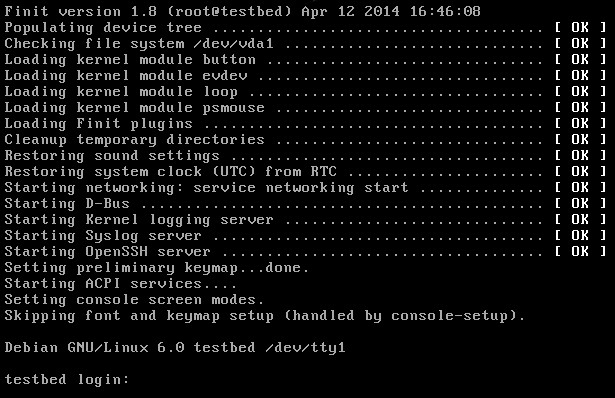
The default install does not setup finit as the system default
`/sbin/init`, neither does it setup an initial `/etc/finit.conf`.
It is assumed that users of finit are competent enough to either setup
finit as their default `/sbin/init` or alter their respective GRUB,
LOADLIN, LILO, U-Boot/Barebox or RedBoot boot loader configuration to
give the kernel the following extra command line:
```shell
init=/sbin/finit
```
Debugging
---------
Add `finit_debug`, or `--debug`, to the kernel command line to enable
debug messages. See the output from `configure --help` for more on
how to assist debugging.
```shell
init=/sbin/finit --debug
```
Origin & References
-------------------
This project is based on the [original finit][] by [Claudio Matsuoka][]
which was reverse engineered from syscalls of the [EeePC fastinit][] —
"gaps filled with frog DNA …"
Finit is developed and maintained by [Joachim Nilsson][] at [GitHub][].
Please file bug reports, clone it, or send pull requests for bug fixes
and proposed extensions.
[1]: https://en.wikipedia.org/wiki/Process_supervision
[2]: http://cr.yp.to/daemontools.html
[3]: http://smarden.org/runit/
[4]: http://en.wikipedia.org/wiki/Init
[5]: http://en.wikipedia.org/wiki/Runlevel
[6]: http://upstart.ubuntu.com/
[7]: http://www.freedesktop.org/wiki/Software/systemd/
[8]: http://www.gentoo.org/proj/en/base/openrc/
[9]: https://github.com/troglobit/troglos
[10]: ftp://troglobit.com/finit/finit-3.0.tar.xz
[TCP Wrappers]: https://en.wikipedia.org/wiki/TCP_Wrapper
[run-parts(8)]: http://manpages.debian.org/cgi-bin/man.cgi?query=run-parts
[original finit]: http://helllabs.org/finit/
[EeePC fastinit]: http://wiki.eeeuser.com/boot_process:the_boot_process
[Claudio Matsuoka]: https://github.com/cmatsuoka
[Joachim Nilsson]: http://troglobit.com
[GitHub]: https://github.com/troglobit/finit
[Travis]: https://travis-ci.org/troglobit/finit
[Travis Status]: https://travis-ci.org/troglobit/finit.png?branch=master
[Coverity Scan]: https://scan.coverity.com/projects/3545
[Coverity Status]: https://scan.coverity.com/projects/3545/badge.svg